 QuorBots
Star Trek Fleet Command
The STFC bot that hunts hostiles while you're offline
QuorBots plays Star Trek Fleet Command in MuMu Player on your own PC, and hunts hostiles while you're offline: up to four ships at once, each in the system you choose, only in fights no harder than you allow, home to repair at low hull and straight back out. Mining, away teams, the station's upgrades and every free reward keep going too, on unlimited accounts, day and night.
What it does
17 actions in STFC
Tick the ones you want on each account. QuorBots works through them, then moves on to the next account.
Mining
Keeps the ships you tick mining what you choose (tritanium, parsteel, dilithium, raw latinum, crystal, gas or ore) and brings them home when the protected cargo is full.
Missions
Completes your missions with one ship, and a second if the first can't go on: trips, deliveries, mining, fights no harder than you allow, and payments in ordinary resources, never Latinum. When none are left, it picks up new ones at the planets that give them.
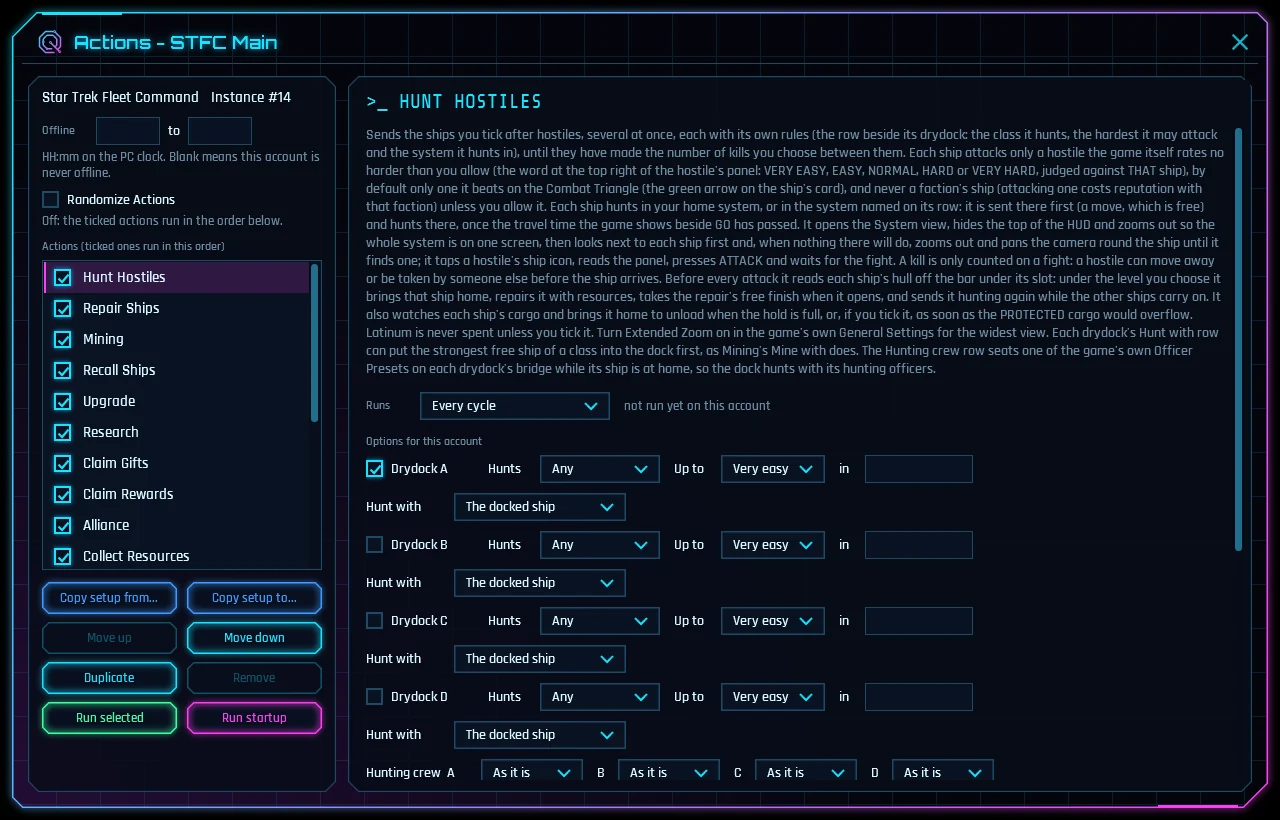
Hunt Hostiles
Up to four ships hunt at once, each with its own target, difficulty and system, or with systems picked by hostile level. Only fights no harder than you allow, never faction ships, home at low hull, repaired with the free finish and the alliance's help, and back out.
Repair Ships
Repairs damaged ships in the drydocks you tick, asks the alliance for help and takes the free finish.
Recall Ships
Brings the ships you tick home to the station.
Refinery
Refines raw crystal, gas and ore, and raw latinum, at the grades you choose.
Away Teams
Hands in finished away teams and sends every idle assignment with the game's own crew pick, at the odds you choose.
Upgrade
Upgrades the station buildings you tick, one per free build slot. Operations is ticked to start.
Research
Keeps research running in the tree you choose: Combat, Station, Galaxy, Starships and more.
Collect Resources
Taps every ready parsteel, tritanium and dilithium bubble on your station.
Claim Gifts
Takes every free chest on the Gifts page.
Claim Rewards
Collects free event milestones, battle pass rewards, Daily Goals, the objective mission and Syndicate rewards.
Open Loot Chests
Opens the loot chests from your kills and collects ship parts, officer XP and speed-ups.
Q's Trials
Runs Q's Trials with your free Trial Bells and claims the wins and milestone rewards.
Recruit
Takes the free weekly Mission Key Drop and recruits officers with recruit tokens you own, on the cards you tick.
Alliance
Helps alliance members, asks for help on your builds and research, and claims alliance chests.
Peace Shield
Keeps a shield up with the shield items you own, renewing when you choose.
Hunting
Auto grind hostiles while you're offline
One row for each drydock
Tick a drydock, A to D, and give its ship its own rules:
- Hunts: Explorers, Interceptors, Battleships or Survey ships, or Any to leave it to the Combat Triangle (Battleships beat Explorers, Explorers beat Interceptors, Interceptors beat Battleships).
- Up to: the hardest hostile it may attack, in the game's own words from Very easy to Very hard, judged against that ship. Very easy to start.
- in: empty for your home system; a system's name as the game spells it, which sends the ship there first (a free move); or auto, which picks the nearest system whose hostiles' levels fit the range you set (20 to 26 to start).
- Hunt with: the docked ship, or the strongest Explorer, Interceptor or Battleship not in another dock.
- Hunting crew: one of your own Officer Presets, seated while the ship is at home.
How a hunt goes
- The ships make the Kills per run you set between them (5 to start). A kill counts only on a fight, since a hostile can move off or be taken first.
- By default a ship attacks only a hostile it beats on the Combat Triangle, and never a faction's ship, which would cost you reputation with that faction.
- Before every attack it reads each ship's hull. Under Recall below hull (50% to start) that ship goes home, is repaired with resources, asks the alliance for help, takes the free finish, and goes back out while the others carry on.
- A ship goes home to unload when its hold is full, or as soon as its protected cargo would overflow if you tick that.
- Afterwards the ships are recalled to the station, which is free.
All night, with the rest of the account
Each turn the ships make their kills, then QuorBots does the account's other jobs, such as Mining, Missions, Away Teams and Claim Rewards, and comes round again. Turn on Extended Zoom in the game's own General Settings first, for the widest view of a system.
What it spends
- Latinum only if you tick the INSTANT repair, which is off and says plainly that it can cost a lot.
- Your own repair speed-ups and resource tokens only if you tick them. It never buys one.
- Ships can still be destroyed by a stronger hostile or player, as when you play, so start on the safe settings and push them as your ships grow.
Several accounts
STFC multiple accounts on one PC
What extra accounts are for
A station's vault protects its resources, so raiding your own second account takes little. Extra STFC accounts earn on their own: each hunts and mines for itself.
In turn, or several at once
By default the accounts take turns: QuorBots plays one, then the next, round and round until you press Stop, with one emulator running at a time. Raise Sessions on the Settings page and that many play side by side, as far as your PC's processor, RAM and graphics card allow.
Setup
How to set up the STFC bot on your PC
Install QuorBots and the game
You need QuorBots, from the Download page (its free trial plays every job for 3 days), and MuMu Player, the free Android emulator QuorBots plays in: Install MuMu Player and add your first account has every step, with pictures. Then, on QuorBots' Install page, press Create instances, pick Star Trek Fleet Command in Game, tick the emulators and press Install. QuorBots sets each emulator up and puts the game on it.
Sign in and finish the tutorial
Open the emulator in MuMu Player, start Star Trek Fleet Command and sign in. On a new account, play the game's tutorial to its end first, which takes about 25 minutes and has you join an alliance. Until it ends, the game keeps menus hidden that QuorBots needs.
Switch on Extended Zoom
In the game, open Settings, then General, and turn Extended Zoom on. Hunt Hostiles looks for hostiles on the widest view of the system, and this gives it the most to choose from.
Add the account and pick its jobs
On the Accounts page, add an account, pick its emulator and the game, and press Editor.
- Free version, for good: Mining, Missions, Recall Ships, Collect Resources, Claim Gifts and Alliance.
- Hunt Hostiles: tick the drydocks that hunt and give each its target, the hardest fight it may take in the game's own words (Very easy to Very hard) and its system. Up to four ships hunt at once, only fights the game rates no harder than you allow, never faction ships unless you say so, home to repair at low hull and back out. Auto grind, above, has every option.
- Repair Ships repairs with resources and takes the free finish: run it every cycle, or every 5 to 15 minutes, so the free finish is caught. Latinum is never spent unless you tick it.
- Missions works through your missions with one ship, and a second if the first can't go on, paying only in ordinary resources, never Latinum.
- Upgrade, Research and Claim Rewards keep the station growing, and Peace Shield keeps a shield up from shield items you own; it never buys one.
Press Start
QuorBots plays every account that is switched on, one after another, until you press Stop. The log shows each job ending Done, Nothing to do, or Not done with the reason. Running several accounts covers copying a setup to other accounts, playing several at once, and each account's schedule and breaks.
Safe by default
Nothing is spent unless you allow it
Latinum only where you say
Only the INSTANT repair can spend latinum, in Hunt Hostiles and Repair Ships. Both are off until you turn them on, and they say plainly what they cost.
Safe fights first
Hunting starts on the easiest hostiles, only the ones your ship beats, leaves faction ships alone and recalls at half hull.
Your items, your call
Speed-ups, resource tokens and recruit tokens are used only where you tick them. Real-money offers and the paid pass track are never pressed.
Free version
Free in STFC, with no end
The free version plays these actions on every account for good, with no key and nothing to pay. The free trial plays every action for 3 days. Both start in the app with one press.
- Mining
- Missions
- Recall Ships
- Collect Resources
- Claim Gifts
- Alliance
Questions
STFC questions
Can it hunt hostiles while I'm offline?
Yes, that is what Hunt Hostiles is for. Tick the drydocks that hunt and give each one its target: the hostile's class, the hardest it may fight and the system, or a range of hostile levels for QuorBots to pick systems by. Each turn the ships make the kills you set, coming home to repair at low hull and going straight back out, then QuorBots does the account's other jobs and comes round again, all night. The hunting section above has every option.
How do I set up the Star Trek Fleet Command bot on my PC?
Install MuMu Player and QuorBots, and start the free trial. QuorBots' Install page makes a MuMu instance and puts Star Trek Fleet Command on it. Sign in to your account there once, add the account in QuorBots, tick the actions you want and press Start. The setup section above has every step.
Is QuorBots a Discord bot?
No. A Discord bot for Star Trek Fleet Command posts reminders, gift codes and calculators in a Discord server. QuorBots plays Star Trek Fleet Command itself, in MuMu Player on your Windows PC, one account after another.
Does it work with BlueStacks, LDPlayer or on a Mac?
No. QuorBots runs on a Windows 10 or 11 PC (64-bit) and plays in MuMu Player, the free Android emulator. It makes and sizes the MuMu instances for you, so there are no emulator settings to learn.
Will it spend my latinum?
Not unless you tell it to. The only latinum option is the INSTANT repair, off when you start. Everything else uses free finishes and the items you choose.
Can it lose my ships?
Hunting and mining carry the same risk they do when you play: a stronger hostile or player can destroy a ship. QuorBots starts on the safest settings (the easiest hostiles, ones it beats, home at half hull), and you choose how far to push them.
Does it play more than one STFC account?
Yes, as many as you like, on one key. QuorBots plays each account in turn, each with its own jobs ticked, then moves on to the next. The several-accounts section above shows how.
What does the free version do in STFC?
It runs Mining, Missions, Recall Ships, Collect Resources, Claim Gifts and Alliance, with no end and no key. The free trial runs every action for 3 days. Both start in the app with one press, once per PC.
Can I get banned for using an STFC bot?
It can happen. Games don't allow bots, so no bot is ever completely risk-free. QuorBots plays like a person to keep the risk low, and breaks and offline hours make it look even more natural. An account played nonstop, day and night, stands out the most. If you're unsure, start on an account you can afford to lose.
Let QuorBots play STFC
Free to try. One key plays every game, on unlimited accounts.