 QuorBots
Whiteout Survival
The Whiteout Survival bot that auto farms every account
QuorBots plays Whiteout Survival (WOS) in MuMu Player on your own PC, on unlimited accounts, day and night. Every free march goes out to gather meat, wood, coal or iron, while your Furnace keeps upgrading, troops keep training, and beasts and Intel missions are hunted within the stamina you allow. Your farm accounts fill up as they gather, and you can raid them with your main to take what their Storehouse doesn't protect.
What it does
32 actions in Whiteout Survival
Tick the ones you want on each account. QuorBots works through them, then moves on to the next account.
Gather
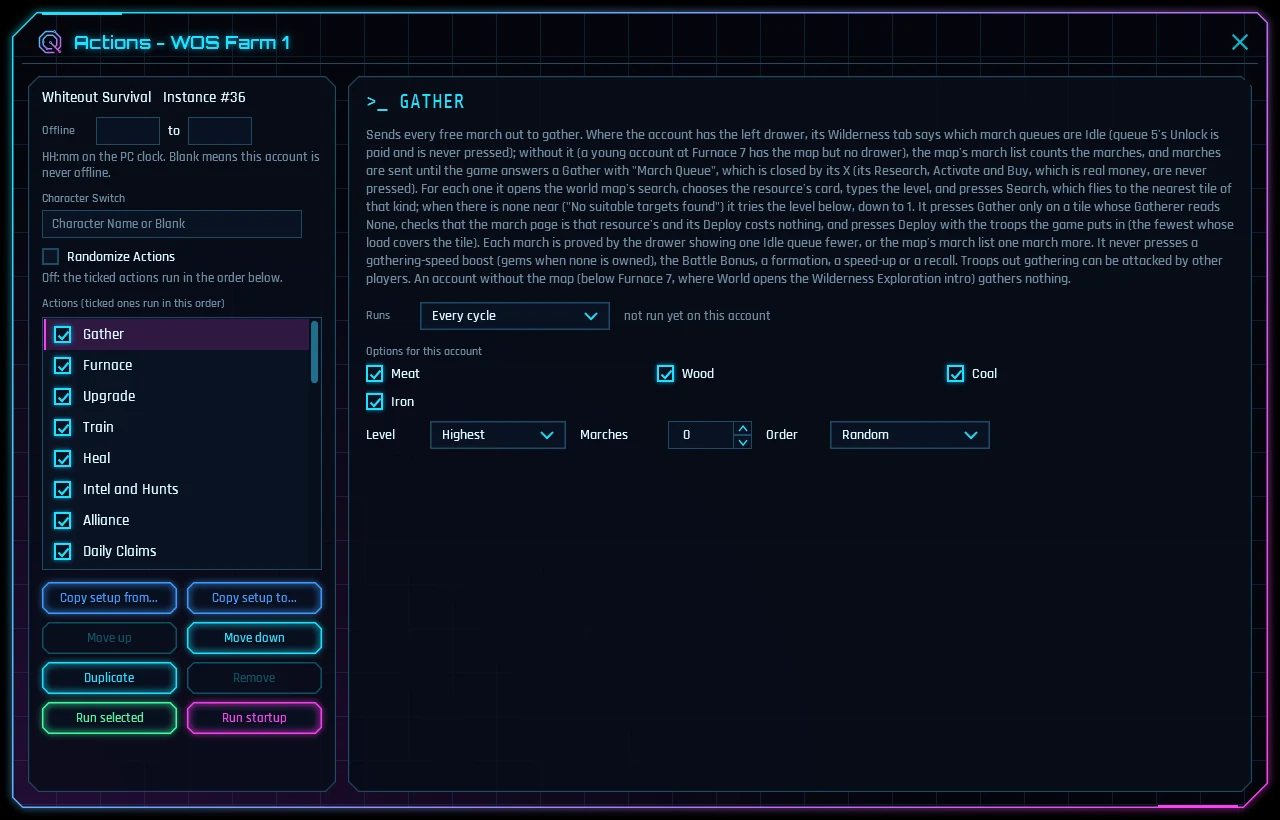
Sends every free march to gather meat, wood, coal or iron, on free tiles only. It looks for the level you set first and goes lower when none is near. Choose Lowest to gather what the account has least of.
Upgrade
Upgrades the buildings you tick, in random order, until the builder is busy. The Furnace is ticked to start, and it can upgrade what a building needs first.
Train
Collects finished batches and keeps the Infantry, Lancer and Marksman camps training.
Intel and Hunts
Claims Intel rewards, runs beast and rescue missions, and hunts beasts it finds on the map. It attacks only when the game says you're likely to win, and stays within the stamina you set.
Rallies
Joins your alliance's rallies on Polar Terror beasts and the Bear Trap's bear, a few a run, with the game's own split of troops or a saved formation. A rally on a player's city is never joined.
Heal
Heals wounded troops with resources. Set a number for each troop type to heal in small batches that finish sooner. With speed-ups ticked, it asks your alliance for help first.
Build
Builds new buildings on open lots, Shelters included.
Research
Keeps the Research Center busy in the Growth, Economy and Battle trees.
Enlistment Office
Brings back troops lost beyond the Infirmary with the free Enlist Now.
Furnace
Keeps the Furnace's Max Power switch the way you want it.
Survivors
Welcomes new arrivals, fills empty work slots and sets the Cookhouse recipe.
Chief Orders
Enacts the Chief Orders you tick whenever they are off cooldown, paid in Contentment.
Daily Claims
Collects the free daily claims: the 7-Day sign-in, Trials, Rookie's Growth, missions, mail, Storehouse chests and more.
Endless Trial
From Furnace 10: makes the day's three challenges against the trial's boss and claims the Daily Challenges' rewards. No stamina and no gems.
Events
Walks the Events tabs and claims the free point milestones and event tasks.
Alliance
Helps allies, contributes to the recommended alliance tech and claims loot chests.
Heroes
Levels up heroes with your hero XP, only for the rarities you tick.
Hero Gear
Enhances hero gear with the stones you own.
Chief Gear
Enhances chief gear and raises Chief Charms with your materials, then claims Collection Gallery rewards.
Recruit
Takes the free hero recruits and the Points Chest.
Pets
Uses pet skills, sends pets on treasure adventures, takes ally treasure and feeds your pets.
Exploration
Claims the idle chest and fights Exploration stages if you set a number.
Arena
Fights the free daily Arena challenges, against weaker opponents only.
Labyrinth
Does the free daily Labyrinth raid and takes the milestone chests.
Tundra Trek & Academy
Claims the free Trek Supplies, walks the Tundra Trek and does the Dawn Academy's gifts and lessons.
Daybreak Island
Taps the island's Life Essence bubbles and claims its finished tasks.
Backpack
Opens the items in your Backpack, adding gem items to your balance and opening resource packs when a resource runs low.
Shops
Shops by your ticks, each off to start: the VIP Shop's meat and wood for gems, the Mystery Shop for its badges and the Nomadic Merchant for the resources you choose. Only the VIP Shop spends gems.
City Bonus and Shield
Keeps a shield up if you tick it, with the free shield first and then a shield item you own. Leave it off on a farm account you plan to raid.
VIP
Claims the daily VIP sign-in and the free Daily Bundle.
Gift Codes
Redeems the gift codes you list, once per account.
Game Settings
Turns off night snowfall and the day/night cycle on every account.
Rallies
Auto join Bear Trap and Polar Terror rallies
How Rallies joins
Each time QuorBots plays the account, Rallies opens your alliance's War page and its Rally tab, and joins each open rally on a beast you ticked: the march page, your troops, and Deploy. A rally on anything that is not a beast, such as a player's city, is never joined.
- Polar Terror rallies and Bear Trap rallies each have a tick box. Both are ticked to start.
- Rallies a run is the most it joins in one visit, 3 to start. Each join takes a free march queue.
- Formation picks the march: the game's own split of troops, or one of your saved formations 2 to 8. A formation that is still locked sends the game's split.
What a join costs
Joining a rally costs no stamina. If the game ever prices a join in stamina, Stamina kept is the floor it will not go under. Nothing else is spent: no gems, no items.
Bear Trap on every account
Rallies joins what is open when the account's turn comes round, so have QuorBots playing during your alliance's Bear Hunt. With several accounts in the alliance, it joins on each one in turn. To keep marches free for the bear, set Marches under Gather below your march queues.
The loot chests
A full rally leaves at once, and its win brings every member a loot chest. Alliance, which is in the free version, claims them with its Loot chests tick.
The game's own Auto-Join
Polar Terror has an Auto-Join switch of its own at the foot of the War page. QuorBots never presses it: switching it on is your call.
Farm accounts
Whiteout Survival farm accounts
Make the farms on a phone
Whiteout Survival won't let a new character be made on an emulator, so make each farm on your phone first. It then signs in on MuMu Player with Facebook, Google or Google Play Games, and plays there as normal.
Several farms in several states on one login? One emulator plays them all: add an account for each in QuorBots, on the same emulator, and type each character's name in its Character Switch box exactly as its Chief Profile shows it. QuorBots switches to it by name before its jobs.
Get each farm to Furnace 7
Below Furnace 7 there is no world map, so a farm has nowhere to gather. Upgrade has the Furnace ticked to start and can upgrade what a building needs first, and QuorBots follows the game's guide hands through Furnace 7's tutorial, but never onto a real-money price, an account binding or a consent dialog.
A farm's jobs
- Gather sends every free march to gather meat, wood, coal or iron, on free tiles only. It looks for the level you set first and goes lower when none is near; choose Lowest to gather what the farm has least of. It never presses a gathering-speed boost.
- Daily Claims takes the 7-Day sign-in, Trials, Rookie's Growth, missions, mail, Storehouse chests and more.
- Alliance helps allies, contributes to the recommended alliance tech and claims loot chests.
- Game Settings keeps Nighttime Snowfall and the Day/Night Cycle off.
Those four are Whiteout Survival's free version, so a farm runs on them for good with no key. Upgrade, Train and Research grow it faster with the free trial or a key.
Raid your farms with your main
Keep a farm in your main's state, out of its alliance, with no shield up. What a farm gathers on the map isn't protected, so your main can attack it and take what the farm's Storehouse doesn't cover. QuorBots gathers; the raid is yours. City Bonus and Shield puts up a shield only where you tick Keep a shield up, so leave it off on these farms.
As many farms as you like
A key has no account limit. Set up one farm, then Copy setup to... the others, and QuorBots plays them one after another, all day and night. Running several accounts and the setup below have every step.
Setup
How to set up the Whiteout Survival bot on your PC
Install QuorBots and the game
You need QuorBots, from the Download page (its free trial plays every job for 3 days), and MuMu Player, the free Android emulator QuorBots plays in: Install MuMu Player and add your first account has every step, with pictures. Then, on QuorBots' Install page, press Create instances, pick Whiteout Survival in Game, tick the emulators and press Install. QuorBots sets each emulator up and puts the game on it.
Sign in once
Open the emulator in MuMu Player, start Whiteout Survival and sign in. The first time, the game downloads close to 3 GB of its own data: let that finish.
Add an account for each character
On the Accounts page, add an account, pick its emulator and the game, and press Editor. For several characters (in several states) on one login, add an account for each, on the same emulator, and type the character's name in its Character Switch box exactly as its Chief Profile shows it. QuorBots switches to it by name before its jobs.
A good farm setup:
- Free version, for good: Gather, Daily Claims, Alliance, and Game Settings, which keeps Nighttime Snowfall and the Day/Night Cycle off.
- Gather sends every free march to the nearest tile of the resources you tick, at the level you choose. It never presses a gathering-speed boost.
- Upgrade, Train, Heal and Research keep the city growing, and Furnace keeps its Max Power switch as you choose.
- Intel and Hunts claims the Lighthouse's Intel and hunts beasts within a stamina budget, deploying only when the game's own odds line reads green.
- Gift Codes redeems the codes you list, once on each character. Type them exactly as published.
- City Bonus and Shield keeps a shield up with the free rechargeable shield, then your own shield items, never gems. Tick Keep a shield up only where you want one.
A young city needs Furnace 7 first: below it there is no world map, so Gather, Heal and Intel and Hunts have nothing to do. QuorBots follows the game's guide hands through Furnace 7's tutorial, but never onto a real-money price, an account binding or a consent dialog.
Press Start
QuorBots plays every account that is switched on, one after another, until you press Stop. The log shows each job ending Done, Nothing to do, or Not done with the reason. Running several accounts covers copying a setup to other accounts, playing several at once, and each account's schedule and breaks.
Safe by default
Nothing is spent unless you allow it
Gems only where you say
Just two options can spend gems: the VIP Shop's resource buys and buying VIP time. Both are off until you turn them on.
Free buttons only
Gem finishes, paid speed boosts, extra Arena challenges and real-money packs are never pressed.
Your items, your call
Speed-ups and resource packs are used only where you tick them, and the alliance is never joined, left or disbanded for you.
Free version
Free in Whiteout Survival, with no end
The free version plays these actions on every account for good, with no key and nothing to pay. The free trial plays every action for 3 days. Both start in the app with one press.
- Gather
- Daily Claims
- Alliance
- Game Settings
Questions
Whiteout Survival questions
Can the bot run my Whiteout Survival farm accounts?
Yes, as many as you like on one key. Gather sends every free march out on each farm, and Gather is in the free version too. What a farm gathers on the map isn't protected, so you can raid the farm with your main and take what its Storehouse doesn't cover. Keep the farm in your state, out of your main's alliance, with no shield up. QuorBots gathers; the raid is yours. The farm accounts section above has the setup.
Is there an auto heal, and can it heal in small batches?
Yes. Heal heals the Infirmary's wounded each time QuorBots plays the account: all of them with the game's Quick Select, or a number of each kind you set under Most of each kind, so a batch ends sooner and the next run heals again. It presses the heal only when every cost can be paid, and never the gem finish beside it. Resource packs and healing speed-ups are used only if you tick them, and with speed-ups it asks your alliance for help first.
Can it join Bear Trap and Polar Terror rallies?
Yes. Rallies joins the rallies your alliance starts on Polar Terror beasts and on the Bear Trap's bear during Bear Hunt, with the game's own split of troops or the saved formation you choose. A join costs no stamina, and a rally on a player's city is never joined. Polar Terror's own Auto-Join is left for you to switch on. The rallies section above has the settings.
Does it do auto hunting without the game's paid Auto Hunting?
Yes. Intel and Hunts runs the Lighthouse's beast and rescue missions and, if you tick Hunt beasts, attacks beasts found on the map at the level you set. Each attack is sent only when the game itself rates it a likely win, within the Stamina budget you set (60 a run to start). It never buys stamina and never opens the game's own Auto Hunting.
Can it keep a shield up automatically?
Yes, on the accounts you tick. City Bonus and Shield puts a shield up when none is running: the free rechargeable shield first, then the shortest shield item you own, and never one that would cost gems. The shield is looked at on the account's turn, so between a shield ending and that turn the city is open. Attacking or scouting a player breaks a shield; gathering and hunting beasts don't.
Can it redeem gift codes on every account?
Yes. Type the codes into Gift Codes, exactly as published, and copy the setup to your other accounts. Each account redeems every code once on its own turn; a code the game has answered there is never typed again. QuorBots doesn't look for codes: you add the ones you find.
How do I set up the Whiteout Survival bot on my PC?
Install MuMu Player and QuorBots, and start the free trial. QuorBots' Install page makes a MuMu instance and puts Whiteout Survival on it. Sign in to your account there once, add the account in QuorBots, tick the actions you want and press Start. A new Whiteout Survival character has to be made on a phone first; once made, it plays in MuMu Player as normal. The setup section above has every step.
Is QuorBots a Discord bot?
No. A Discord bot for Whiteout Survival posts reminders, gift codes and calculators in a Discord server. QuorBots plays Whiteout Survival itself, in MuMu Player on your Windows PC, one account after another.
Does it work with BlueStacks, LDPlayer or on a Mac?
No. QuorBots runs on a Windows 10 or 11 PC (64-bit) and plays in MuMu Player, the free Android emulator. It makes and sizes the MuMu instances for you, so there are no emulator settings to learn.
Can QuorBots start a new Whiteout Survival account for me?
No. The game refuses a brand-new character in an emulator and asks you to create it on your phone first. A character made on a phone logs in and plays in MuMu Player as normal.
Will it spend my gems?
Not unless you tell it to. Only two options can spend gems, both off when you start. Real-money packs are never pressed.
Does it work on a young account?
Yes. Actions that need a higher Furnace, like Pets, Hero Gear and Chief Gear, wait until the account reaches it and do the rest meanwhile. The world map opens at Furnace 7, so Heal, Intel and Hunts and the Alliance wait for that too.
Does it play more than one Whiteout Survival account?
Yes, as many as you like, on one key. QuorBots plays each account in turn, each with its own jobs ticked, then moves on to the next. Running several accounts shows how.
My login has more than one character. Can QuorBots pick one?
Yes. Type the character's name in the account's Character Switch box and QuorBots plays that character. Leave it blank and it plays whichever the game opens on.
What does the free version do in Whiteout Survival?
It runs Gather, Daily Claims, Alliance and Game Settings, with no end and no key. The free trial runs every action for 3 days. Both start in the app with one press, once per PC.
Can I get banned for using a Whiteout Survival bot?
It can happen. Games don't allow bots, so no bot is ever completely risk-free. QuorBots plays like a person to keep the risk low, and breaks and offline hours make it look even more natural. An account played nonstop, day and night, stands out the most. If you're unsure, start on an account you can afford to lose.
Let QuorBots play Whiteout Survival
Free to try. One key plays every game, on unlimited accounts.